Think, Sleep, and Play Games is an indie game development studio. Also just called TSP Games or TSP, TSP's interest range from hyper casual to AA Indie Games.
Author: TSP Larry
I'm an normal guy with a passion for making games. I started with technologies such as Flash and Game Maker, and currently primarily use Unreal Engine and Unity.
A Game Jam is a type of “themed” game development contest. Single Developers and/or teams submit games created specifically for the Jam. Games are Judged based on different categories such as Art, Fun, and Uniqueness.
Game Jams come in different lengths. Some Game Jams might last a couple hours, and some might last a couple days.
The best part about a Game Jam is that each Game Jam has it’s own Unique Theme. This theme isn’t told to anyone until the exact start time. This creates a fun layer of suspense and mystery. You can’t start brainstorming ideas until the clock starts ticking.
My Entry & Progress
When the Jam starts on Saturday August 24th at 3:00PM EST, I will begin development and probably wait until later in the week to post. I’ll definitely make a post when the Jam is over for my final entry.
I’ve also got some ideas for more tips and content for this blog. So stay tuned. Thanks for reading.
This one is a shorty. Be careful when setting the default game state class for custom game modes. Choosing a game state class that extends “GameState” can break your player controller somewhat.
My personal Experience
I was experiencing an issue with my player controller. You might have guessed it, my player controller was not working. Oddly, the tick function was running; but the BeginPlay event was not being called. This messed up a bunch of other things. After a lot of stress, i switched the game state class from “GameState” to “GameStateBase” and it worked.
I really wish unreal had popup notifications for this. Maybe i’ll do a post explaining the differences later when i read up more about it.
Whenever i find something useful, i want to share it with others. Something recently that caught my eye was the ability to give blueprint nodes multiple outputs. Which output is executed is specified by your logic. This is done via the “ExpandEnumAsExecs” meta specifier for UFUNCTIONs.
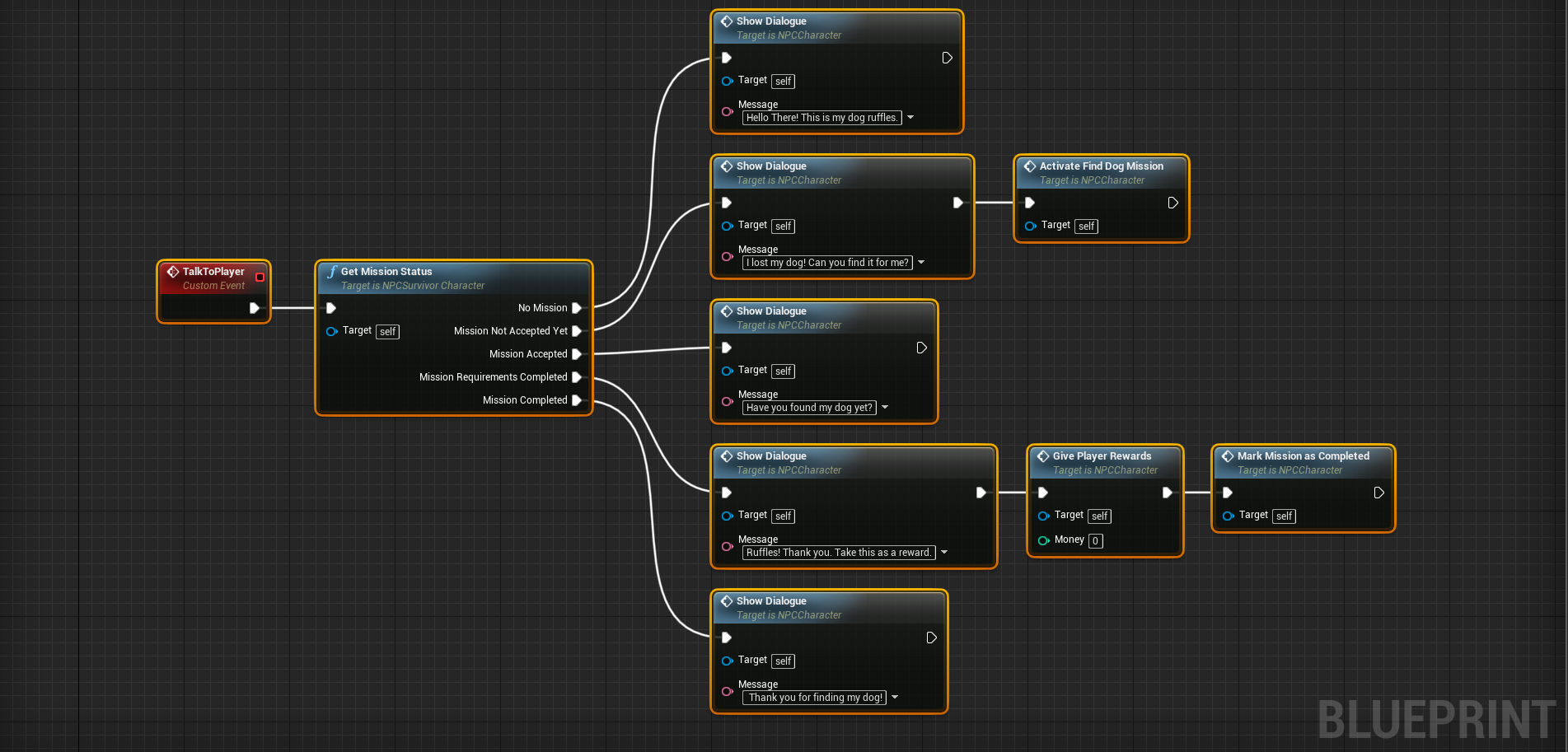
Here is an example to get things started. The example we are going to use features an NPC and their dog. After the mission has been activated, the NPC will give the user a “find dog” mission when they speak to the player.
Logically speaking, When the NPC talks to the player; the blueprint node will check the current mission status. Afterwards it will execute a specific set of blueprint nodes based on the status of the mission.
NOTE: I also added some extra functions (Speak to Player, Activate Find Dog Mission, Give Player Rewards, and Mark Mission as Complete) to the screenshot to assist in understanding real world application of the mission.
Here you can see the NPC will say something different for each status:
Before the mission is active (aka No Mission) – Hello There! This is my dog ruffles.
When the mission is active, but not accepted – I lost my dog! Can you find it for me?
While the mission is active – Have you found my dog yet?
Once you’ve completed the mission’s requirements (found her dog) – Ruffles! Thank you. Take this as a reward.
After you have received your reward – Thank you for finding my dog!
Why would i want to do this?
This tip isn’t required for game development in unreal. It’s purpose is to help assist other developers. A developer would want to do this to simplify blueprint logic. Keeping a blueprint clean and readable is important when creating games using them.
Setting up the code
First you need an enumeration. This enumeration must be created in a c++ class.
After your enumeration is complete, you need to declare a ‘BlueprintCallable’ UFUNCTION. This UFUNCTION should take in an out reference to the previously created function . In the meta data for this function, the “ExpandEnumAsExecs” specifier should be set. It’s value should be the name of the associated parameter.
// ANPCSurvivorCharacter.H
UCLASS()
class SOMESURVIVALGAME_API ANPCSurvivorCharacter : public ACharacter
{
	GENERATED_BODY()

public:

	UFUNCTION(BlueprintCallable, Category = "NPC|Missions", Meta = (ExpandEnumAsExecs = "MissionStatus"))
		void GetMissionStatus(ENPCMissionStatus & MissionStatus);
};
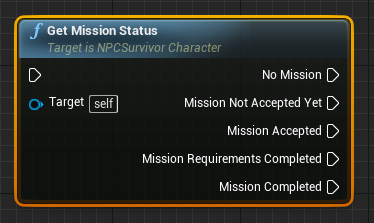
The above, once defiend properly will look like such:
ExpandEnumAsExecs = “MissionStatus”
Finally, you need to define the the previously declared function. In the function definition, you need to set the value of the passed in enumeration parameter.
// ANPCSurvivorCharacter.cpp
void ANPCSurvivorCharacter::GetMissionStatus(ENPCMissionStatus & MissionStatus)
{

	bool HasMission = false; // ... Implement your logic here
	bool IsMissionAccepted = false; // ... Implement your logic here
	bool HasCompletedMissionRequirements = false; // ... Implement your logic here
	bool IsMissionComplete = false; // ... Implement your logic here

	if (!HasMission) {

		MissionStatus = ENPCMissionStatus::No_Mission;
	}
	else if(!IsMissionAccepted){

		MissionStatus = ENPCMissionStatus::New_Mission;
	}
	else if (!IsMissionComplete) {

		MissionStatus = ENPCMissionStatus::Active_Mission;
	}
	else if (HasCompletedMissionRequirements) {

		MissionStatus = ENPCMissionStatus::Mission_Requirements_Completed;
	}else {

		MissionStatus = ENPCMissionStatus::Mission_Completed;
	}
}
Thats it. The example chosen should be pretty easy to understand, but this can be applied to anything your game needs.
I started up TSP Games because i wanted to get serious with Game Development. I’ve used a lot of game engines/frameworks in the past:
Game Maker
Adobe Flash
HTML5/Javascript
Construct 2
RPG Maker
Microsoft’s XNA
Unity
Unreal Engine
I also am somewhat okay at drawing, graphic design, and 3d modelling. Those 3 are my weakest fields however, and i do want to improve on them.
Flash Games
Game Development was always a hobby of mine, the most “success” i had was with Adobe Flash. I quote the word success because it’s relative. I defined my success with it as actually fully completing games start to finish. Back when it was an active/popular technology, i did actually also make some money off of games made with it. I cannot brag however because a lot of people did, and a lot of people did make more in fact. I can’t brag about it, but i can take some pride in the completed work.
What is now know as just FGL.com, used to be FlashGameLicense.com. This was a site where flash developers could interact, upload, and sell games to publishers. I really miss these days. The game jams. The chat room. First impressions and leveling up. It was a lot of fun. Maybe i’ll do a short post on it. I also did contractor work as a flash/html5 developer. This was really cool also. I got to work on some cool projects that i’ll forever be grateful & appreciative for/of.
Not really making games….
Fast forward to around 2019. I still “make games” but i don’t really make games. What i mean is, i would make a lot of prototypes, but never finish them. I had a lot of ideas that got started, and never finished. I think there are many aspects to why they were never finished. However overall i think one reason i stopped is because i didn’t have a goal or motivation besides the fun i get from doing it.
I have done a lot of Unity prototypes, with various gameplay mechanics; but never really finished anything. Lately i switched over to Unreal Engine, and was starting on that same path for a while. However, i’m not sure where/how; i decided to make a goal and try to seriously work for it.
Goals
I don’t want to become rich from making games. I’m not trying to make some huge game development company that becomes a household name. I think my first/simplest goal at the moment is to make a game, and for someone random to tell me in person that they really enjoyed it and/or it touched them. I want to earn it though, i don’t just want it from friends or family who wouldn’t want to hurt my feelings or are just being nice.My second/third goal(s) would be to publish a game for Steam and then for Console. I have some ways to go until then. I’m still learning a lot. However, that’s what i decided on. That’s why i decided to create ThinkSleepPlay-Games.com.
I guess i still could make games without TSP. However TSP represents something solid, that i have decided upon. Ideas, Inspiration, and Motivation can be fleeting. TSP represents my goals as a game developer, and hopefully will help me stay focus.
I’ve found in Blender when you export to Unreal Engine with the default settings, the models are sideways. A quick easy way to fix this is to change the “forward” axis when exporting. The “forward” axis should be changed to -Y, from it’s default value: -Z. That’s what works for me. In addition, blender saves this settting so you don’t have to worry about checking it when further exporting.
Why does this happen?
Well, i’m not sure. But if i had to guess, here are my thoughts.
Blender and Unreal both have the Z and Y axes swapped. Normally the X Axis moves left and right, the Y Axis moves up and down, and the Z axis moves forward and back (into and out from the screen). I think the default settings try to make up for this, rotating it for engines/programs that use the Y axis for verticality (is that a word? … probably not?) and the Z axis for depth.
Does this happen in Unity?
I believe so, if you directly export .fbx models. Unity comes built-in with support of blenders “.blend” file format. So you may not run into the “sideways-model” issue because Unity automatically knows how to do things.
Be sure to check out Blender if you haven’t already. It’s a free 3d modelling tool, that can keep up with the professional/paid alternatives.
If you’re developing a game in Unreal Engine and you are using the C++ API, this tip should save you some time. In the Engine’s editor preferences, you can disable automatically compilation when new c++ classes are added.
NOTE: This tip is for those using c++ projects. The tip also doesn’t require much technical knowledge, so blueprint users should be able to understand it as well.
Type “compile” in the search box to find the setting, then make sure the checkbox is unchecked.
Why would i do this?
I do this to avoid having to wait unnecessarily when creating multiple classes. Compilation after creating new classes doesn’t take an abnormally long amount of time, but when you are in a groove it can be annoying. In addition, with the option unchecked; you can actually edit your newly created class before compilation. Being able to edit classes before manually compiling saves time as well.
Here’s an example to explain what i mean, and the gains of disabling this setting.
Example – Adding two classes.
Let’s say you want to add two more c++ classes to your Unreal project. For the sake of the example, let’s assume it takes your engine 1 minute to re-compile after creating a new c++ class, and it will take you 5 minutes to actually code the new classes.
With the setting enabled, here is how things would go:
You create a new c++ class
The engine re-compiles (1 minute)
You create a second new c++ class
The engine re-compiles again. (1 minute)
You edit the created classes. (5 minutes)
You manually re-compile. (1 minute)
If you disable the setting, you would cut out the first 2 re-compilations. The overall time difference would be as follows:
Automatic Compilation Enabled: 8 minutes
Automatic Compilation Disabled: 6 minutes
Wow! A WHOLE 2 MINUTES!! Yeah…. i know, not a big deal. But if you want to create 3 classes that turns into a 3 minute difference. Also, depending on your machine; what if re-compilation takes 2 minutes? Then that 8 minutes turns into 11 minutes, whereas the 6 minutes only turns into 7 minutes. If recompilation for your takes 2 minutes, there is a 4 minute difference.
It’s definitely not required for game development with Unreal Engine. I just thought i’d let other people know it’s there. Automatic compilation after creating c++ classes was very annoying for me for a while. I now do this at the start of every project.
T-th-th-Tha-That’s all folks. Thanks for reading, i hope it helps someone.
I first learned of Founders’ Fortune watching a Let’s Play on YouTube. I liked the graphics style and I needed a new game to play. So a little later that day i downloaded the game. About 6-8 hours later i finally managed to save & close the game, hopefully that should say enough about the game.
NOTE: The game itself is in an alpha version but is very stable. I didn’t encounter any performance bugs at all.
What is Founders’ Fortune?
Founder’s Fortune is kind of like The Sims meets Age of Empires. You have to manage resources and build your colony/village, while simultaneously catering to each of your villagers’ specific personality traits, needs, and stats. The mixing of these two game types is well done.
In founder’s fortune you manage your village and it’s villagers throughout the 4 seasons. You can give them specific jobs & tasks to do, and must also mange the villagers themselves.
I’ll try to explain some major aspects of the game below.
Crystals & Research
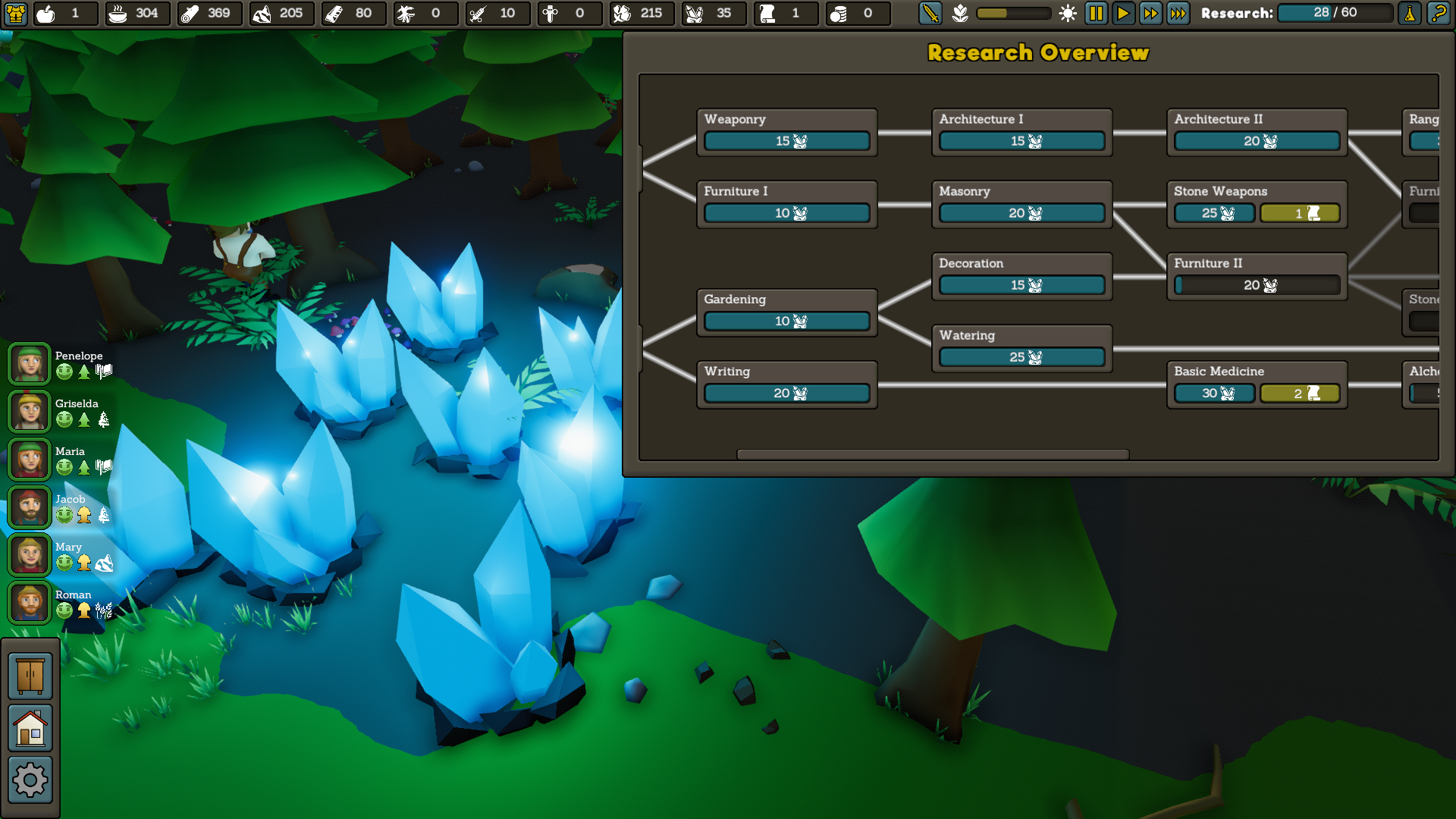
Shiny Blue Crystals and the Research Tree.
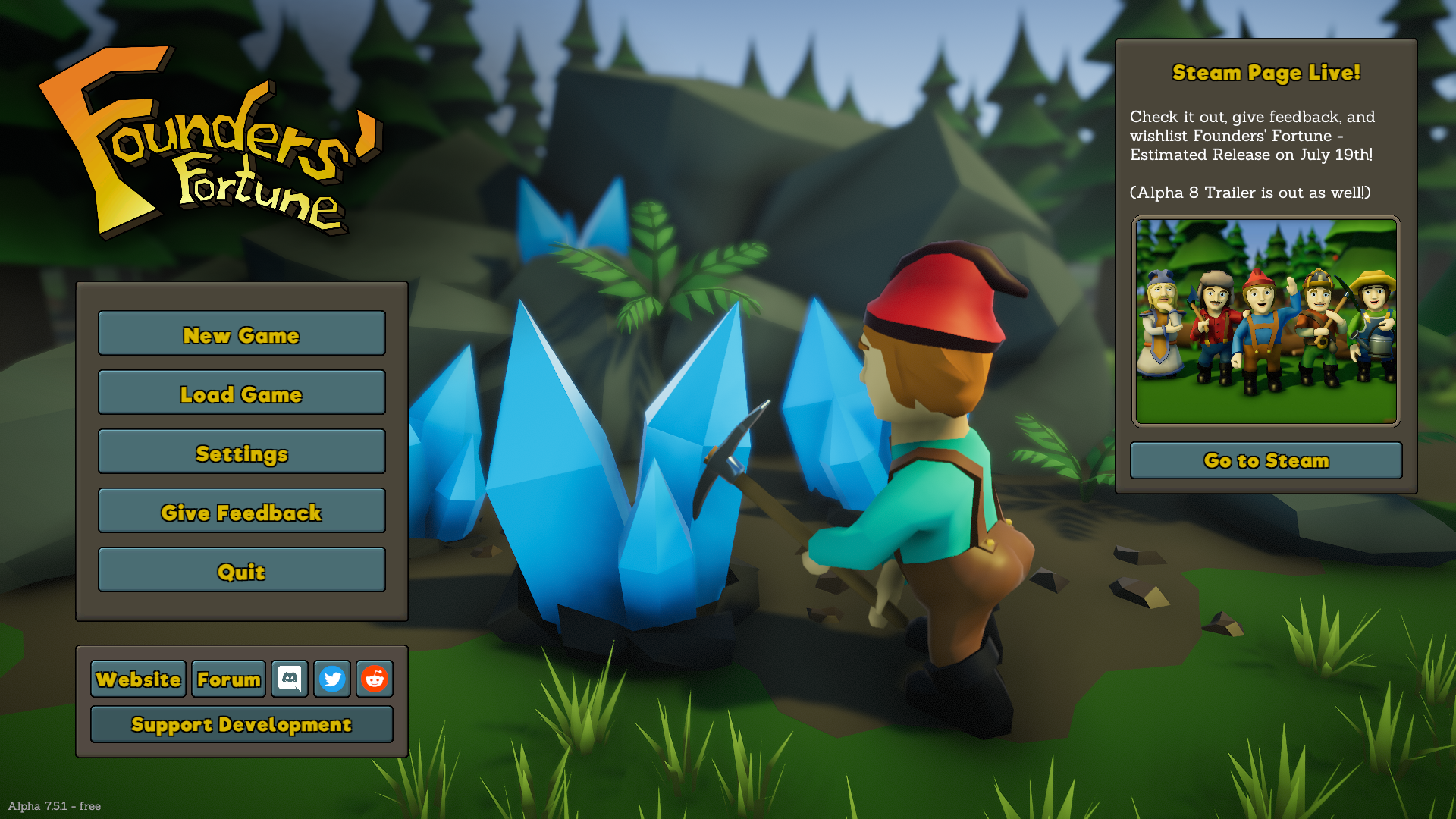
In RTS games the player must tasks his available units with gathering resources. A unique type of resource in Founders’ Fortune are it’s Crystals. Shown in the screenshot above (and on the main menu), these crystals are your primary resource for the research process. The research process is how the player unlocks new items to build & craft.
First-off, the crystals must be mined. After being mined, they can be analyzed. Analyzing crystals earns your points towards unlocking new research nodes. Each Research Node will have prerequisite research nodes (except for the first two).
Resources
Griselda Heisenberg gathering wood. Same my name!
Once you have unlocked something from research you’ll need the necessary resources to build it. The primary collectible resources in Founders’ Fortune include:
Iron Ore
Stone
Wood
Cotton
Researching and gathering resources are a common feature in RTS games. Founders’ Fortune does it’s village building a little bit different though.
Village Building
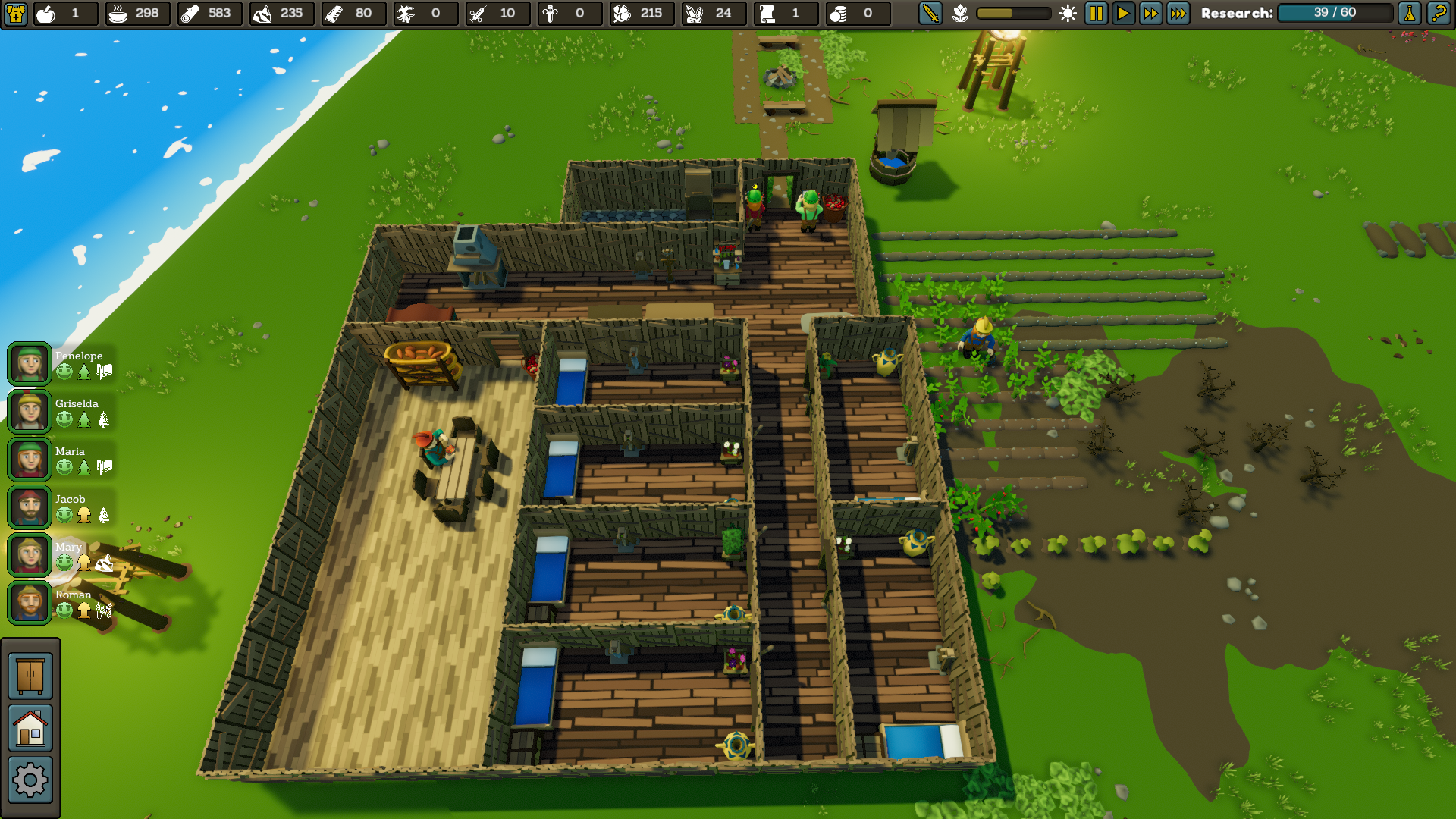
Not exactly an HGTV quality 6-Bedroom house, but it works? Do they ever use the bathroom?
With unlocked material you can build up your village. There are no predefined buildings however. Like in the sims you can place walls, doors, and flooring wherever you want. There are different types of floors, walls, and doors. You can also decorate the interior and exterior with a vareity of items such as Vases and potted plants.
A cool feature is that each villager is aware of what their “home” is, and what their “room” is. A villager’s “room” is the enclosed space where their assigned bed is. A villager’s “home” is the overall space that encloses their room.
Researching, gathering resources, and building your own custom village isn’t the end of things though. Enter a Sims-style villager management system.
Villagers
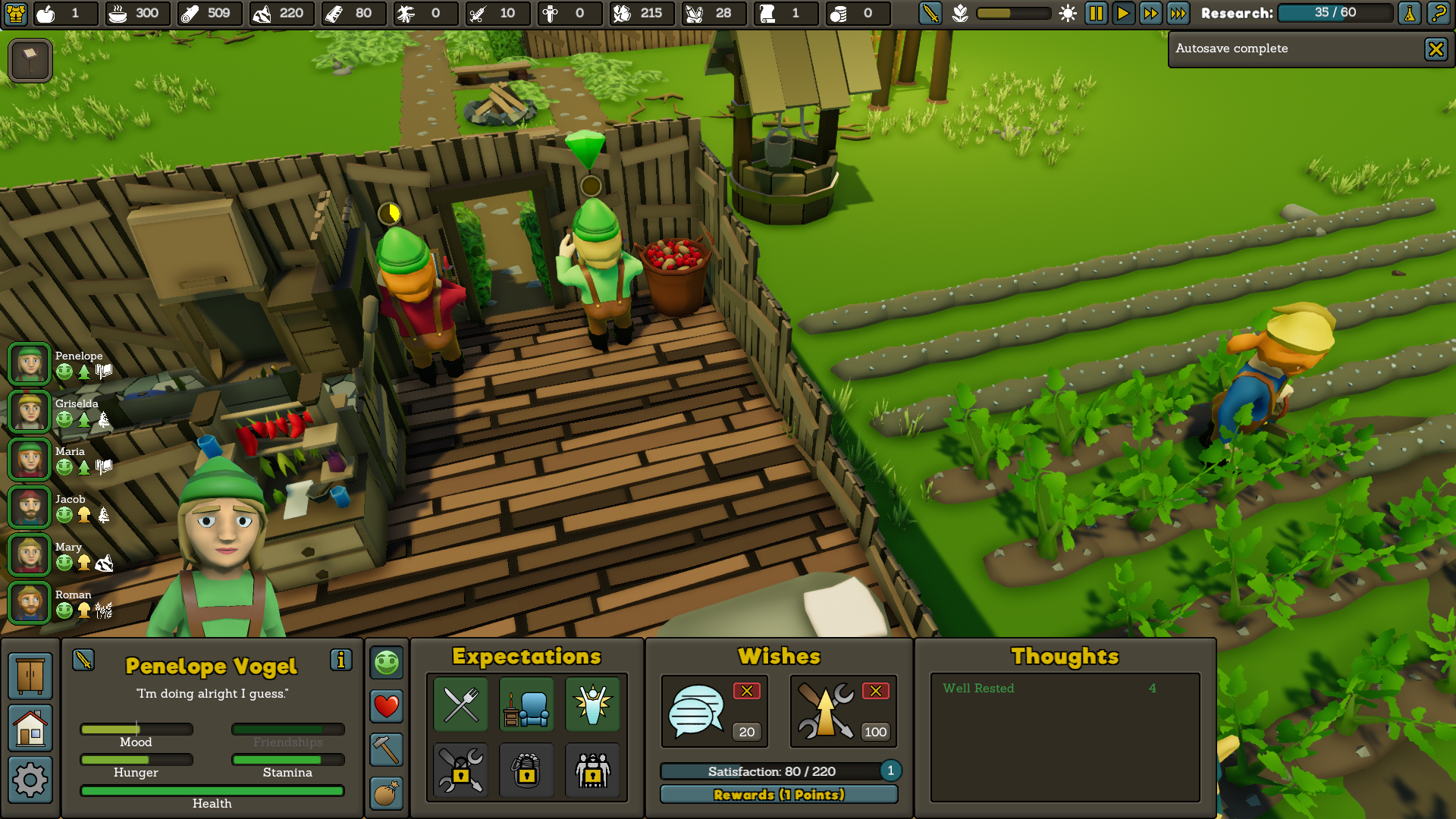
A well-rested Penelope Vogel does some research.
All of your villagers in Founders’ Fortune are unique. Each villager will have his or her own expectations, wishes, thoughts, stats, and traits. You’ll have to manage all of that for each villager, while keeping an eye on the seasons and your resources. It sounds like a handful, but you get the hang of it real quick and it’s a lot of fun.
I only got up to six villagers. I had the opportunity to recruit 2 more, but i wanted to be prepared for a nearing winter. Unlike in a lot of RTS games, you cannot recruit new villagers on demand. They will come to your village over time, if all your villager’s expectations are met.
Stats
A villager’s stats include their Hunger, Health, Stamina, and Mood.
Stats – Hunger
As long as their is food, villagers will feed themselves. If there is no food, they will start to starve and their health will drop. You can increase or decrease a villager’s food rations if necessary.
Stats – Health
When a villager loses all their health, they die. A villager’s health can drop when they get the sick, and/or are damaged in battle. A villager regains health using health potions and also by sleeping.
Stats – Stamina
As a villager works, they lose stamina. When their stamina is depleted they must sleep. If a villager as a Insomnia trait, they will require double the amount of sleep.
Stats – Mood
When a villager’s mood reaches it’s limit, they will stop working. Your villagers’ mood changes based on their thoughts. More about thoughts below…
Wishes & Satisfaction
Each villager will have two wishes at given time. Granting these wishes will earn them a specified number of satisfaction points. When a villager gets enough satisfaction points, their satisfaction level goes up one.
A villagers’ wishes can include things like:
Killing the local enemy Goblins
Reaching a certain level in a specific job field.
Talking to fellow villagers
Decorative items in their rooms
Thoughts
Yep, villagers have their own thoughts too. This is a pretty unique add-on to the game. A villagers’ thoughts affect their mood. They vary in where they come from, but positive thoughts increase a villager’s mood; whilst negative thoughts decrease a villager’s mood. A villagers’ thoughts can include things like:
Being optimistic (from a trait)
Being in pain
Being well-rested
Being hyped-up after killing a goblin or winning a fight.
Having had a bad dream.
Having had a good/bad conversation
There are a variety of thoughts a villager can have, which helps keep things fresh and novel.
Goblins, Seasons, and Trading
Some final aspects of the game i’ll go over are Goblins, Seasons, and Trading.
Goblins
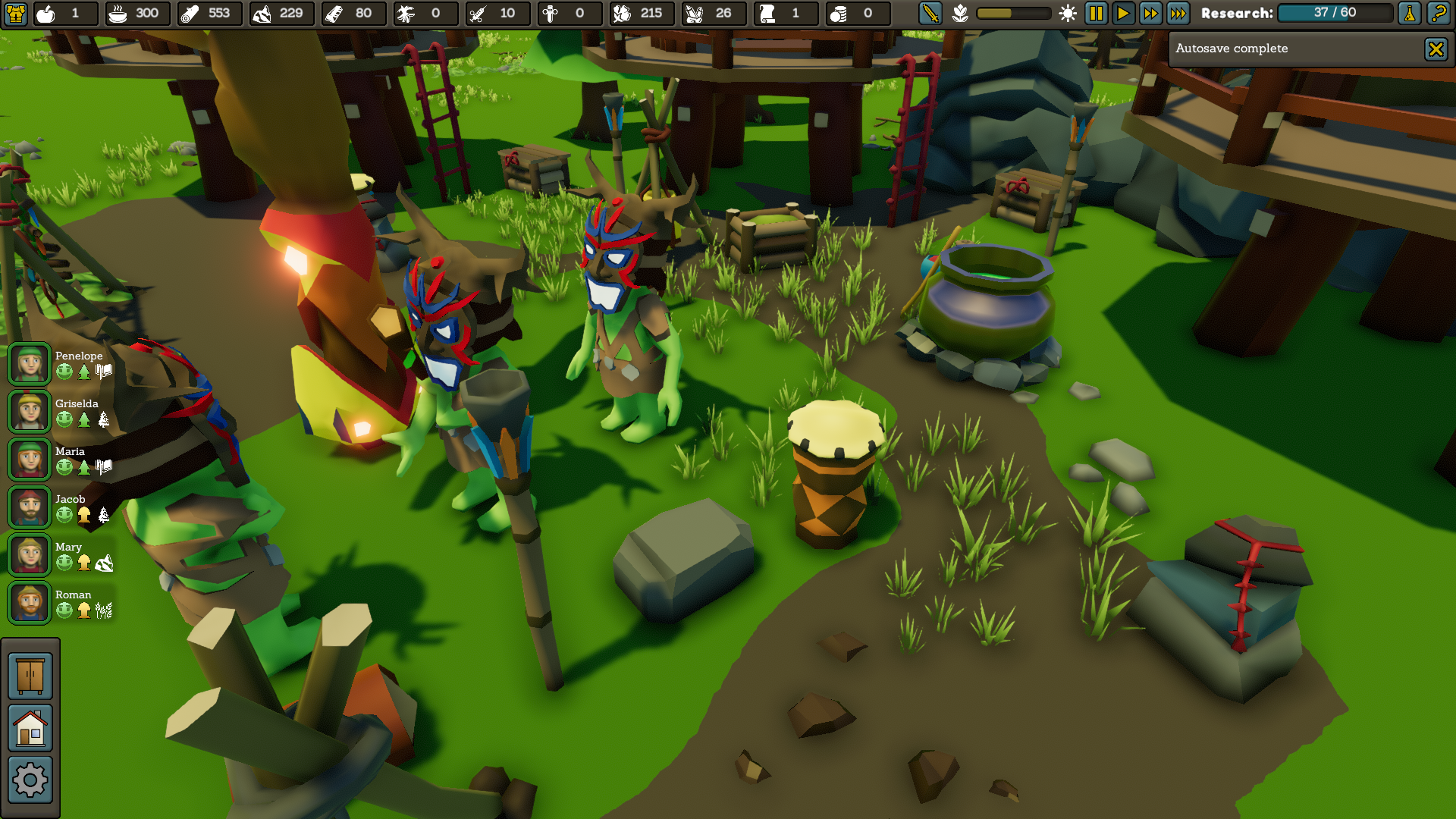
Just your friendly neighborhood Tiki-Goblins having a nice conversation about…….Whatever Tiki-Goblins talk about!?!
At least in the normal difficulty, goblins are a minor part of the game. Occasionally they will attack your village. However, it’s not difficult to defend against the attack and receive little damage.
Seasons
Founders’ Fortune cycles through the four seasons. A cool feature is that certain farming crops only grow in specific seasons, and nothing grows during winter. This does add an interesting spin to the game’s strategy.
To be honest, I didn’t think i would make it through my first winter. I didn’t have too much food saved up, and crops would no longer grow. My saving grace was in trading. Fortunately i had a lot of wood to trade when the trading merchants came along.
Trading
Occasionally a trading merchant will appear on the shore. You can talk to the merchant, trade with him, attack him, or kill him. I’m not sure of the ramifications of attacking/killing him, but my curiosity is brewing. Talking didn’t seem to have any affect, maybe this is a bug or unimplemented feature? As for trading, it’s what you would expect. You can trade what you have for coins and/or what he has.
Overall
Overall, Founders’ Fortune is a promising Indie Game that has hours worth of fun. If you are a fan of the RTS genre, it’s definitely a must play. The developers are even cool enough to put a free (super-stable) alpha out. They’ve definitely earned me buying it, and for an early-bird price too.
Hey everyone, TSP Larry here. As founder of TSPGames, Im gonna explain what’s in our name. ‘Think, Sleep, and Play Games’ was chosen because it represents major reoccurring parts of my life. I wanted the brand to be personal.
First off, I’m a heavy thinker. In fact, Very often I think more than I act. It has its pros and cons in the end, so I try to keep it under control but also give it some freedom.
Secondly, for as long as I can remember I have always had sleep issues. Anybody who knows me could tell you this. I won’t dive into the details to save on time.
Finally, making games is a passion of mine. Its something I’ve done for a while, I’ll give more info on that in a later blog post. What’s funny is, the ‘play’ portion could be ‘make’. This would be more accurate, but ‘play’ goes better with a brand.
That’s where it comes from. I hope that answers any major questions. I left certain details out for personal reasons and to save on time.
Think Sleep Play Games is an indie game studio. Our goal is to make serve our passion in game development, and hopefully captivate an audience with our visions & ideas.
I’m not gonna boast and say “we’re the best indie game studio”, or say “we have the best games”. What we do have is a passion for game development. We’ll let that passion be our compass and give every game maximum effort.



 Think, Sleep, and Play Games